Muse Forge: AI Music, Vocal Removal, Chords & Piano Sheets
5 min read

Ever had a melody stuck in your head with no way to get it out? Or fallen for a song and wished you could strip the vocals for a backing track, see its chords, or find a piano arrangement you can actually play — only to bounce between ten different sites?
That's what Muse Forge is for. Built by the Taiwanese audio-AI team DeepWave, it's an AI music creation platform that brings four tools — music generation, stem separation, chord detection, and piano-sheet generation (PopPianoAI) — into one account. From hearing it to making it, in one place. And PopPianoAI is completely free — the easiest place to start.
What is Muse Forge?
Muse Forge is an all-in-one AI music platform with four tools: generate music from a text prompt, split a song into vocal and instrument stems, detect chords (with guitar and ukulele fingerings), and turn any song into a piano arrangement with PopPianoAI. One account, one shared pool of seconds — and PopPianoAI is free, off the clock.
Four AI music tools, from hearing a song to making one
PopPianoAI: turn a song you love into a piano piece you can play
Can't find the sheet music for that song? Paste a YouTube link or upload an audio file, and in about 3 minutes PopPianoAI rearranges the whole track into a piano version.
It's not transcription. Most transcription AI can only turn a piano recording into notation; PopPianoAI creates a piano cover — taking the original pop song (vocals, instruments, rhythm and all) and rearranging it into a score your two hands can actually play. Pop songs, anime themes, you name it.
You get four outputs at once:
- PDF score (with chord symbols — print it and put it on the stand)
- MIDI (drop it into your DAW and keep building)
- MusicXML (edit freely in any notation software)
- Piano audio (hear how the cover sounds first)
The result page offers three views — sheet music, performance view, and piano roll — plus a built-in player. Best of all: completely free, no seconds spent. One free conversion per day without an account, unlimited once you log in.
Before creating a piano cover from any audio, please make sure you own or have obtained the legal rights to use that audio.
Stem separation: split any song into clean, isolated parts
Upload a track, or just paste a YouTube link (audio formats: MP3/WAV/FLAC/OGG/AAC/M4A/OPUS/WebM, up to 100 MB), and in 1–3 minutes it splits into four isolated stems: vocals, drums, bass, and other. Need a backing track for a cover? Want to study the drum groove or the bass line on its own? Want to sample a part and rebuild it? Every sound is yours to use.
Chord detection: instant chords, from listening to playing
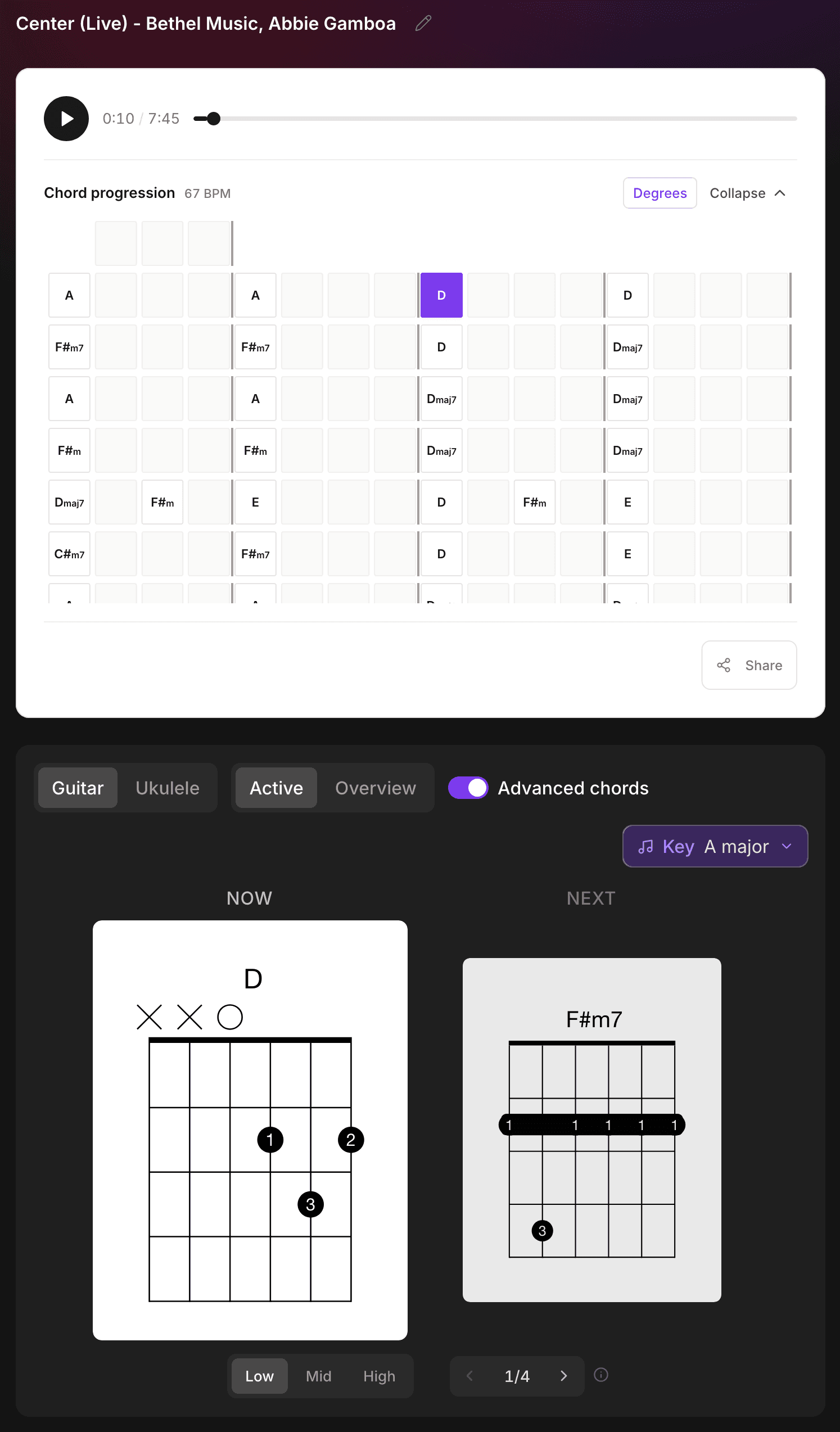
Online chord charts are often wrong, and working them out yourself takes time. Upload a song or paste a YouTube link and the AI detects the whole progression, with guitar and ukulele fingerings right there — look and play. On the result page the diagram cards follow the music, prompting you with "now / next"; the progression chart is laid out bar by bar, four bars to a line, and clicking a cell jumps there. Turn on Advanced chords for the full harmony, or use the Key menu to transpose. You can also pick a voicing per chord, or move a whole section into a Low / Mid / High position — changes save themselves. Details in "Chord Recognition Update: Pick Voicings, Move Up the Neck".
AI music generation: one sentence, one piece of music
No instrument skills, no music theory needed. Type a description — "upbeat lo-fi jazz with soft piano," "cinematic orchestral swell" — and in 30 seconds to 2 minutes you get a piece with a distinct vibe. Don't feel like writing a description? Pick style tags (up to 3) or apply an example prompt, and it estimates the seconds it'll cost before you generate. Each clip is about 32 seconds, and you can generate 1, 2, or 4 at once, then compare them side by side in A/B/C/D tabs on the result page. Video soundtracks, a starting point for a song, or just hearing what's in your head — that's its home turf.
Why Muse Forge instead of four separate accounts?
One site for removing vocals, another for chords, a third for generation — each needs its own sign-up, some charge separately. Muse Forge puts all four in one account on one pool of seconds: separate a backing track and detect its chords in the same flow, turn a generated melody straight into a piano score. No moving files between tools, no switching accounts. Every project lands in one dashboard, ready to pick back up anytime.
And every tool lets you share in one click: whoever opens the link can preview it interactively on the page without signing up — separated stems, detected chords, generated music, piano scores, all of it.
Our philosophy: the best tools shouldn't stand between you and the music.
All four tools work on your phone too: the Muse Forge app is on the App Store and Google Play — same account, same monthly quota, and your works show up on both.
New to music generation and not sure what to type? This guide covers how to write prompts, with 6 examples you can copy.
Muse Forge pricing: start free, upgrade anytime
Muse Forge runs on a monthly seconds-based plan, shared across music generation, stem separation, and chord detection. PopPianoAI is free and doesn't touch your quota.
Plan | Price | Monthly quota | Downloads | Commercial license |
|---|---|---|---|---|
Free | NT$0/mo | 150 sec | MP3 | ✗ |
Starter | NT$79/mo | 2,000 sec | MP3 + WAV | ✓ |
Creator | NT$199/mo | 6,000 sec | MP3 + WAV | ✓ |
The free plan unlocks all four tools: use PopPianoAI as much as you like, and 150 seconds is enough to generate a few pieces and get a feel for it before you decide to upgrade. From Starter (NT$79/mo) up, you get a commercial license, so the music you make is safe to use in your own work and client projects.
FAQ
Is Muse Forge free to use?
Yes. PopPianoAI is completely free and doesn't use seconds; for the other tools, the free plan gives you 150 seconds a month, with music generation, stem separation, and chord detection all available and MP3 downloads.
Can I use the music commercially?
From Starter (NT$79/mo) up, a commercial license is included, so the music can be used in commercial work.
How do I split a song's vocals from the backing track?
Upload the song or paste a YouTube link and use stem separation — the AI splits vocals, drums, bass, and other instruments into isolated tracks within 1–3 minutes, each downloadable separately.
How does PopPianoAI turn a song into sheet music?
Paste a YouTube link or upload an audio file; in about 3 minutes you get a PDF score, MIDI, MusicXML, and piano audio, with chord symbols. One free conversion per day without an account, unlimited once you log in.
About DeepWave
DeepWave is an audio-AI team from Taiwan. From the meeting-voice tool Meeting Ink to Muse Forge, we've been doing the same thing: making sound technology so easy you forget it's there. Whether you're a producer, a player, a cover artist, or making your first song — the sound in your head deserves to be heard.