Muse Forge App: Split Stems, Get Chords, Make Piano Sheets
6 min read

The song you want to play never shows up at a convenient time.
It's the chorus that hits on your commute. It's the track someone adds to the setlist an hour before rehearsal. It's the thing you heard at 1 a.m. while sitting at the piano. What those moments have in common: your laptop isn't there.
So we built Muse Forge as an app.
Muse Forge is now on iOS and Android
The Muse Forge app is live on the App Store and Google Play, free to download. All five tools from the web — music generation, stem separation, chord detection, PopPianoAI and Forge — are on your phone. Sign in with the same account and your works and monthly quota come with you.
Download on the App Store | Get it on Google Play
What's in the app?
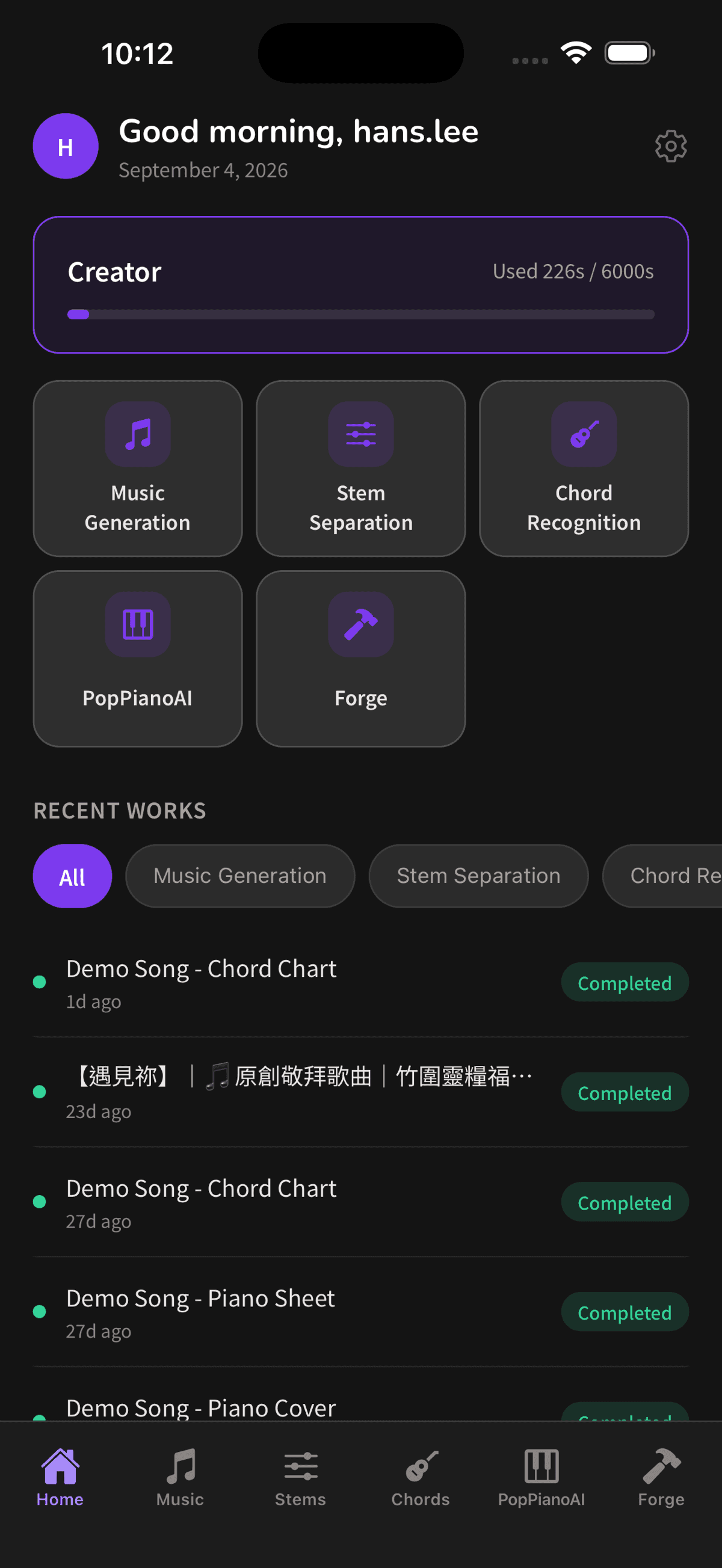
Open the app: home on the left of the tab bar, then one tab per tool.
Stem separation: vocals, drums, bass and everything else
Upload an audio file or paste a YouTube link, and one to three minutes later you have four stems. Play any of them on their own, mute what you don't need — want a clean backing track? Mute the vocals — and download only the stems you want.
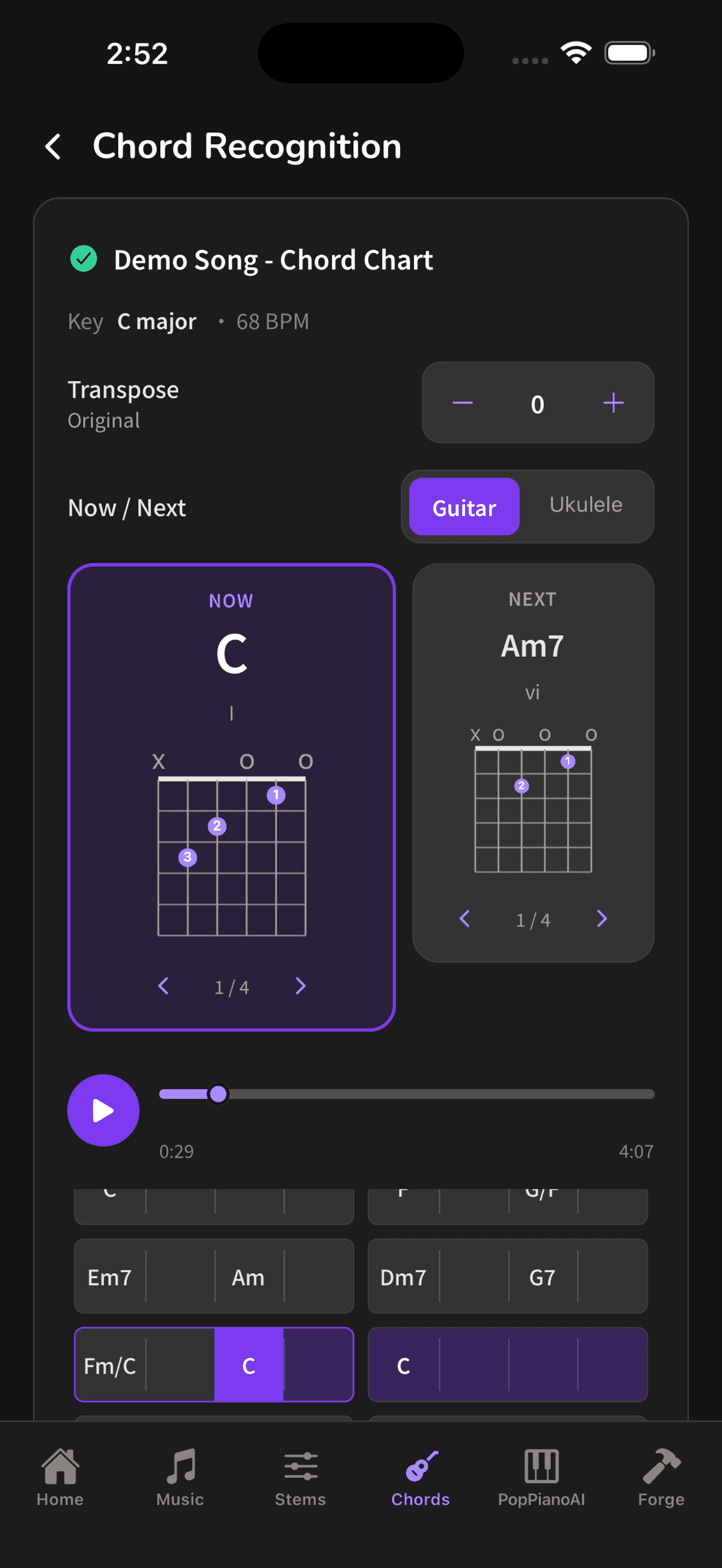
Chord detection: the full progression, with guitar and ukulele shapes
Upload a file or paste a YouTube link. In about one to three minutes you get the chord progression for the whole song, plus the detected key and tempo. Hit play and the chart follows the music, with "now / next" cards calling the change before it arrives. Switch between guitar and ukulele shapes, step through the different ways to grip the same chord, and transpose the whole song when the key doesn't fit your voice.
PopPianoAI: a piano score you can actually play — free
PopPianoAI has always been free on the web. Paste a YouTube link or upload audio and in about three minutes the AI rearranges the song into a piano version with notation.
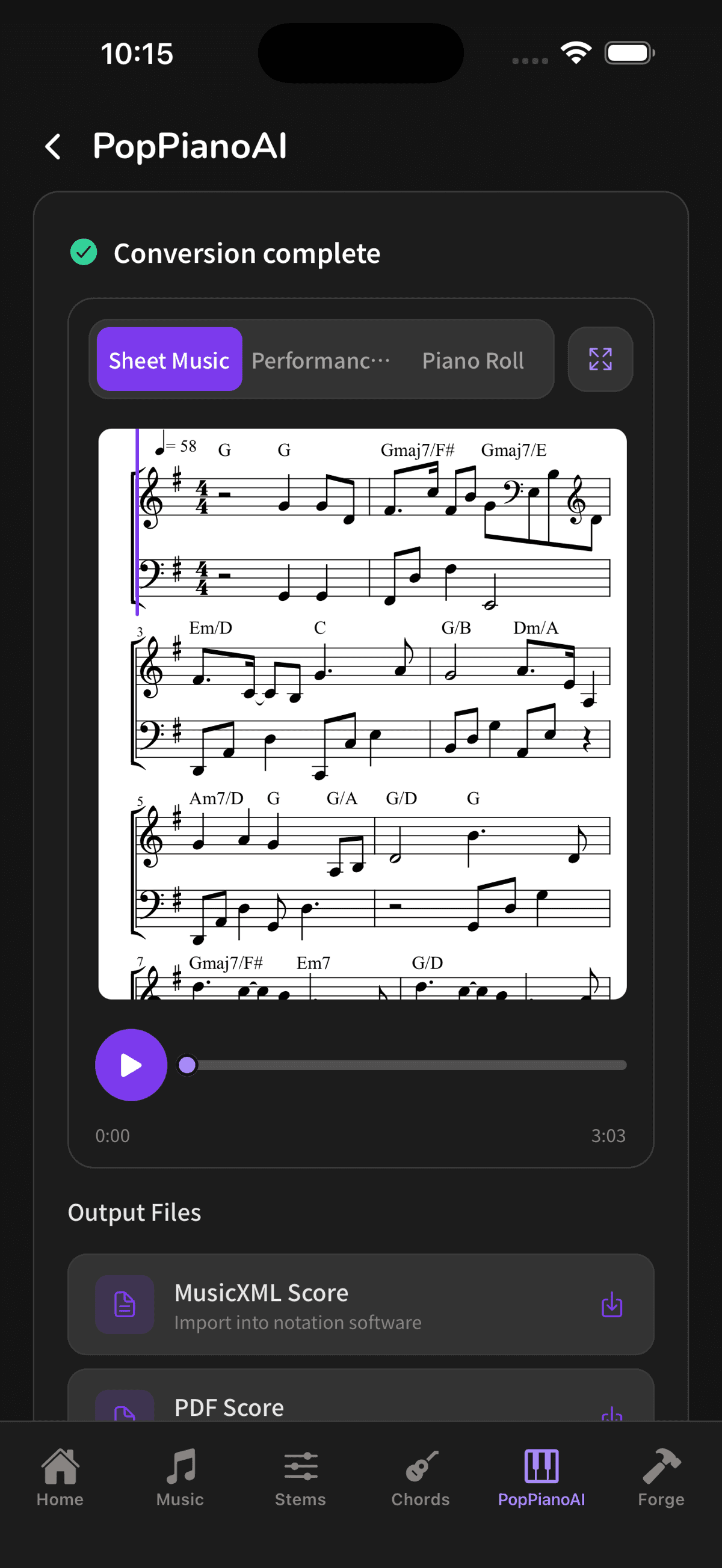
It opens on the sheet music, chord symbols marked above the staff, and plays back while you read. Two more tabs sit above it — performance view and Piano Roll — if you'd rather watch the notes fall.
Export PDF, MIDI or MusicXML and keep editing in whatever notation software you use. PopPianoAI is completely free and never touches your quota.
Music generation: one sentence, one track
Describe the mood, style or instrumentation — "a calm piano piece for reading and relaxing" — add up to three style tags, and you usually have a track in 30 seconds to 2 minutes. Nothing to upload. When a video is missing its background music, this is the shortest path there is.
Not sure how to word a prompt? This guide has the formula and 6 examples.
Forge: upload once, run the whole chain
Pick a template and let it run. The "piano accompaniment" template strips the vocals, turns the backing track into a piano score, and hands you a PDF and a MIDI — from a single upload. Leave the screen while it runs; it picks up where it left off when you come back.
What the phone does better
This isn't the website squeezed into a smaller screen. Some things belong on a phone:
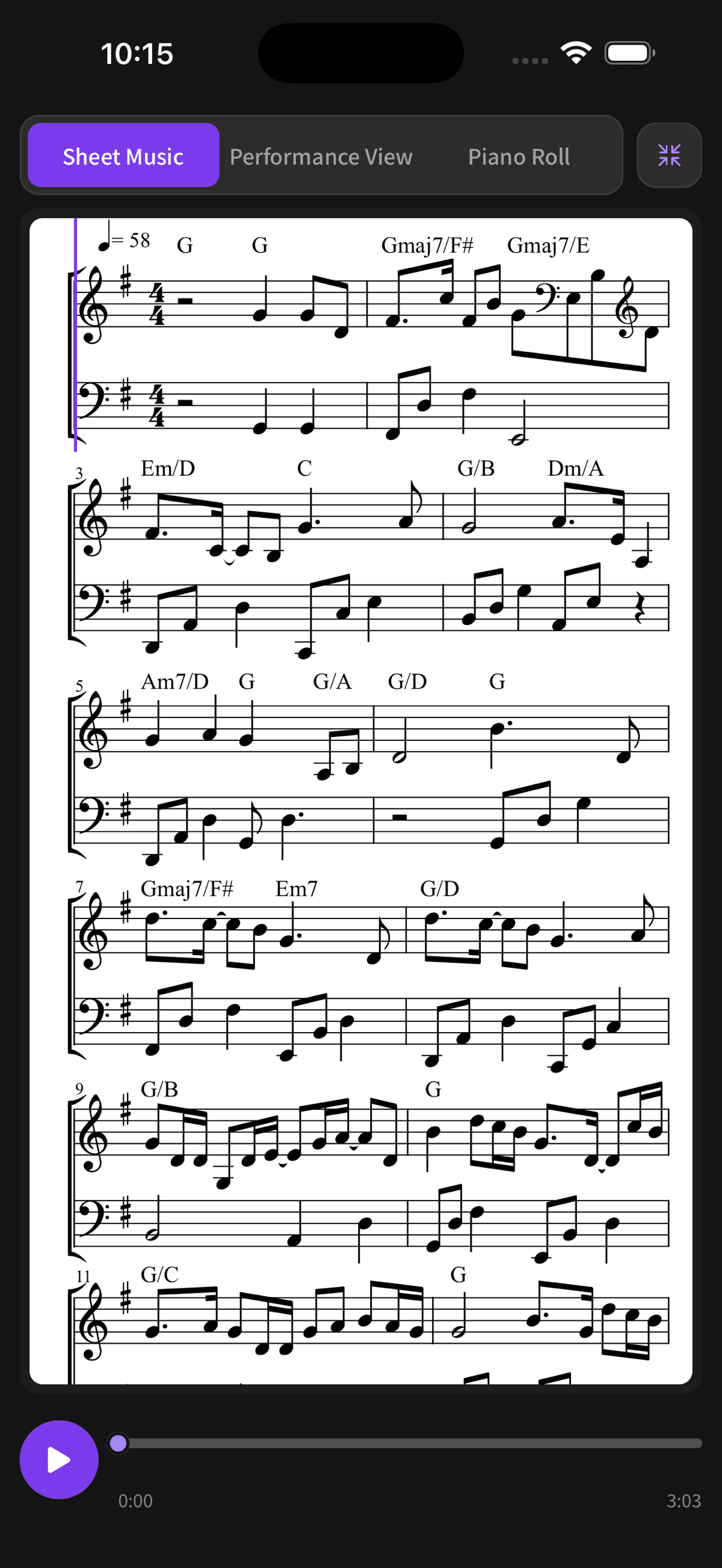
Stand the phone on the piano. The score goes full screen, landscape too, which is exactly the size of a music stand. No printing required.
Hear a song, paste the link. PopPianoAI, stem separation and chord detection all take YouTube links (10 seconds to 20 minutes). Share, copy, paste — three taps from the YouTube app.
Start a job in the gaps. Waiting for food, riding the bus, ten minutes before rehearsal: start it, let it process in the cloud, and come back to it in the recent works list on the home screen.
Sign in with Apple or Google. Or use email if you'd rather not link an account. The interface runs in English, Traditional Chinese and Japanese.
How to get started
Step 1: Download and sign in
Grab Muse Forge from the App Store or Google Play and sign in with Apple, Google or email. Already have a web account? Use it — same login.
Step 2: Pick a tool, feed it a song
Choose a tab. Uploads support MP3, WAV, FLAC, OGG, AAC, M4A, OPUS and WebM up to 100 MB per file; PopPianoAI, stem separation and chord detection also take a YouTube link.
Step 3: Listen, then download or share
Preview the result in the app. The free plan downloads MP3; Starter and Creator add lossless WAV. Every work can be renamed, shared or deleted, and stays in the recent works list on the home screen.
Does anything change on the web?
No. It's the same Muse Forge on the web and on your phone: one account, one plan, one pool of seconds, one library. A separation you ran on your phone is there when you open your laptop.
Some things are still easier with a mouse — batching a stack of songs, fine-tuning chord voicings and positions, dropping MusicXML into notation software. The app covers the other half: being there when the song shows up.
What does it cost?
The app is free to download. The free plan comes with 150 seconds a month, and PopPianoAI is free on top of that — it doesn't spend quota at all.
Need more, you can subscribe in the app: Starter (2,000 seconds a month) or Creator (6,000 seconds a month), both with commercial licensing and lossless WAV downloads. Prices are shown in the App Store and Google Play in your own currency. The seconds are shared across music generation, stem separation and chord detection.
One account only ever carries one Muse Forge subscription — if you already subscribed on the web, signing in to the app gives you that same plan. No second purchase.
Who it's for
- Guitar and ukulele players: chords ten minutes before rehearsal, fingerings right there on the phone
- Piano learners: turn a song into a score and read it off the phone on the music stand
- Cover artists and streamers: mute the vocals, get a backing track, no laptop involved
- Video creators: a background track from one sentence, wherever you are
Before using an audio file for stem separation, chord detection or a piano cover score, make sure you own or have obtained the rights to use it.
That song you keep meaning to learn? You don't have to wait until you're home.
Download on the App Store → Get it on Google Play →
FAQ
Is the Muse Forge app free?
Yes, free to download. The free plan includes 150 seconds a month for music generation, stem separation and chord detection, and PopPianoAI's piano-score conversion is free without spending any quota. Starter and Creator plans are available in the app if you need more.
Does the app have the same features as the web version?
All five tools are in the app: music generation, stem separation, chord detection, PopPianoAI and Forge. The web version goes further on some advanced controls, such as fine-tuning chord voicings and positions. Everyday work — uploading, processing, previewing, downloading and sharing — is all in the app.
I subscribed on the web. Do I need to subscribe again?
No. The subscription belongs to your account, so signing in to the app gives you the same plan and the same quota. One account only ever carries one Muse Forge subscription.
Can I paste a YouTube link in the app?
Yes. PopPianoAI, stem separation and chord detection all accept YouTube links between 10 seconds and 20 minutes long; otherwise upload an audio file. Music generation needs no audio at all — just a text description.
Can I read sheet music on my phone?
Yes. The PopPianoAI score goes full screen, including landscape, so you can stand the phone on the piano and play along. There's also a performance view with falling notes and a Piano Roll view. For paper or further editing, export PDF, MIDI and MusicXML.
Which phones are supported?
iOS 15.1 or later on iPhone; the Android version is on Google Play — search "Muse Forge" or use the links above. The interface is available in English, Traditional Chinese and Japanese, switchable in Settings.