Make a Piano Accompaniment Score From Any Song With AI
4 min read

Your friend is singing at a wedding and asks you to play piano. You find sheet music, but the right hand plays the melody, right on top of the singer. You'd rewrite it as an accompaniment, but you're not sure where to start.
What you need is an accompaniment score: one that leaves the melody to the singer and lets the piano carry the harmony and rhythm.
Forge's Piano Accompaniment Score template removes the vocals from a song, then turns the remaining backing into piano sheet music, all in one run. No separating vocals yourself, downloading, and uploading again to another tool.
What is Forge?
Forge is Muse Forge's template feature. Each template is a ready-made pipeline: pick one, drop in a song, and it chains several tools in order and hands you the finished result.
Here's what the Piano Accompaniment Score template does:
Item | Details |
|---|---|
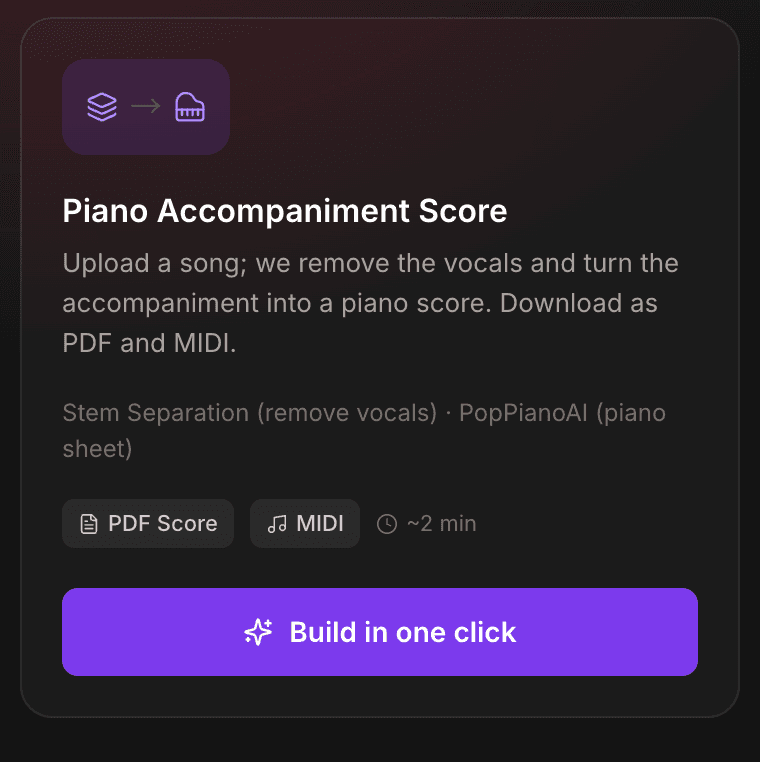
Pipeline | Stem Separation (remove vocals) → PopPianoAI piano sheet |
Input | Upload an audio file, or paste a YouTube video link |
You get | Online piano score and a vocals-removed backing preview, plus PDF, MIDI, MusicXML and piano audio downloads |
Estimated time | ~2 min (varies with song length) |
Quota | Only the vocal-removal step uses quota, based on song length |
Which tool should you use?
Ask one question first: who sings the melody?
- Someone sings (a friend or you), and the piano accompanies: use Forge's Piano Accompaniment Score. The vocals come out first, so the AI only hears the backing and the score centers on the accompaniment, mostly staying out of the singer's way.
- You'll play the whole song on piano, no singing: use PopPianoAI. It arranges the song as a piano cover with the melody in it, so one person can make it sound complete. It's completely free.
- You just want a vocals-removed backing track for karaoke: Stem Separation is all you need.
- You accompany on guitar or ukulele: use Chord Recognition to get the full chord progression with chord diagrams.
Make a piano accompaniment score in three steps
Step 1: Pick the Piano Accompaniment Score template
Open Forge, find Piano Accompaniment Score under Start from a template, and press Build in one click. The card lists the steps in the pipeline and roughly how long it takes.
Step 2: Upload a song or paste a link
Drag an audio file onto the File tab. MP3, WAV, FLAC, M4A, MP4 and other common formats work, up to 100 MB and 10 minutes long. No file handy? Switch to the Link tab and paste a YouTube video URL.
Step 3: Let it run, then take the score
Forge runs each step in order, and the Pipeline shows which one is in progress and which are done. You can leave the page while it works and pick up where it left off when you come back.
If a step fails, press Retry this step to continue from there instead of starting over.
What you get
- An online piano score: it opens on the sheet music, with chord symbols marked and a cursor that follows playback. You can also switch to Performance View or the Piano Roll.
- A backing-track preview: the accompaniment with the vocals removed, so you can hear how the original backing goes before you practice from the score.
- Downloads: print the PDF and put it on the music stand; import the MIDI or MusicXML into a DAW or notation app to change the key or rework the arrangement. There's also an audio file of the piano version.
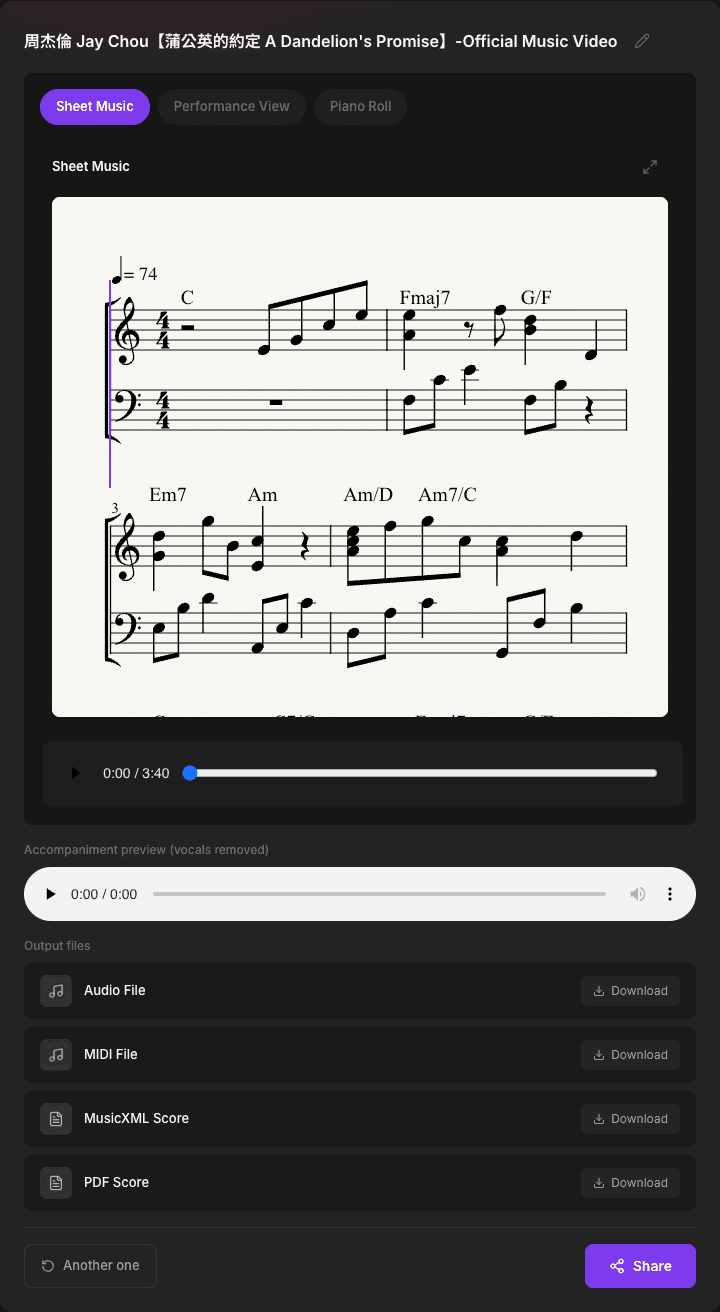
The AI arranges this score from the backing track, so play through it once before you rehearse and adjust anything that feels awkward. To match the singer's key, importing the MIDI or MusicXML into a notation app and transposing there is the easiest route.
How much quota does it use?
Only the Stem Separation (remove vocals) step uses quota, based on the song's length. The piano transcription step is free. Quota is shared with Music Generation, Stem Separation and Chord Recognition, and a free account can try it. If you use it a lot, see the paid plans.
Please upload audio you have the right to use. Before making an accompaniment score from a recording, make sure you own it or have permission to use it.
FAQ
How is this different from a PopPianoAI score?
PopPianoAI listens to the whole original song and arranges a piano cover with the melody in it, so one person can play the entire song. Forge's Piano Accompaniment Score removes the vocals first, so the AI only hears the backing and arranges a score centered on the accompaniment, for playing piano while someone sings.
How much quota does it use? Is it free?
Only the Stem Separation (remove vocals) step uses quota, based on the song's length. The piano transcription step is free. Quota is shared with Music Generation, Stem Separation and Chord Recognition, and a free account can try it.
Which files can I download?
The result page offers four downloads: a PDF score, MIDI, MusicXML, and an audio file of the piano version. Print the PDF as is; import the MIDI or MusicXML into a DAW or notation app to edit it.
Which formats work? Can I paste a YouTube link?
You can upload MP3, WAV, FLAC, OGG, AAC, M4A, MP4, OPUS or WebM, up to 100 MB and 10 minutes long. You can also switch to the Link tab and paste a YouTube video URL (playlists and channel links don't work). YouTube downloads occasionally fail; uploading the file is the most reliable fallback.
What if a step fails partway through?
The pipeline shows which step failed. Press Retry this step to pick up from there instead of starting over, or go back to the templates and start again.
Can I share the score?
Yes. The result page has a Share button, and whoever opens the link can see the result without signing in. Handy for sending ahead to the person you'll perform with.
One song in, an accompaniment score out
No removing vocals, downloading and re-uploading to another tool. Pick the template, drop in a song, and start practicing in about two minutes.
New to Muse Forge? Read the full introduction.