How to Remove Vocals From a Song: Free AI Vocal Remover
4 min read

The fastest way to remove vocals from a song is an AI stem separation tool: upload an audio file or paste a YouTube link, and AI splits the vocals from the backing track in about 1–3 minutes. Download the MP3 for free.
Mute the vocal track and you get a karaoke backing track; keep only the vocal track and you get a clean a cappella. Muse Forge runs in your browser—no software to install.
How does vocal removal work? AI separation vs. the old method
The old “vocal cancellation” trick relies on phase inversion: subtract the left and right channels to cancel whatever sits in the center—the vocals. The problem is that drums and bass usually sit in the center too, so they get gutted, leaving a hollow backing track with vocals still bleeding through.
AI stem separation is different. A model “listens” to each part and pulls vocals, drums, bass and other instruments into separate tracks. Mute the vocals for a backing track, mute everything else for the vocals—both come out clean.
Method | How it works | Backing track quality | Speed |
|---|---|---|---|
Traditional vocal cancellation | Left/right phase inversion | Drums & bass gutted, vocals bleed through | Instant, but poor |
AI stem separation | Model isolates each part separately | Four clean, independently controllable tracks | 1–3 minutes |
How to remove vocals online in three steps
1. Upload a song or paste a YouTube link. Supports MP3, WAV, FLAC, OGG, AAC, M4A, OPUS and WebM (8 formats), up to 100 MB per file. No file? Just paste a link.
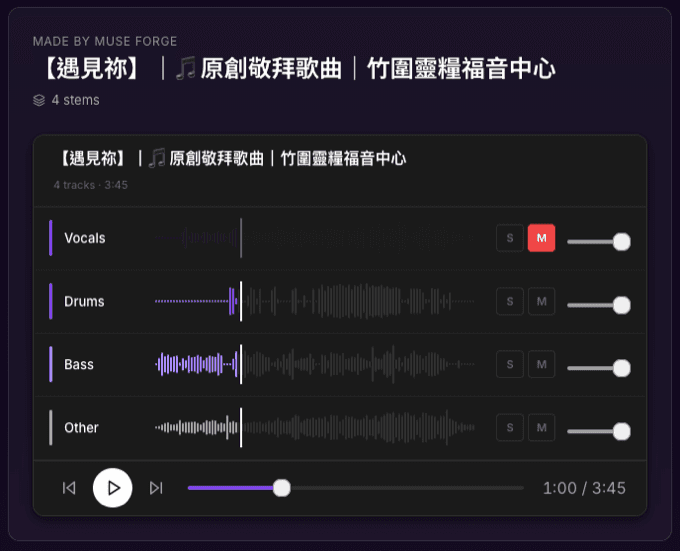
2. Let AI process it. In about 1–3 minutes it splits the song into four tracks: vocals, drums, bass and other.
3. Download what you need. In the multitrack player, mute the vocals—the remaining drums, bass and other tracks are your full backing track. Preview instantly, then download stems individually or grab them all in one zip. MP3 is free; paid plans (from Starter) add lossless WAV.
The result page’s multitrack player lets you click the waveform to jump, click a track name to solo it, set each track’s volume, and use the spacebar to play or arrow keys to skip ±5 seconds—so you can pick out exactly the track you want.
What can you do with vocal removal?
Make karaoke backing tracks and covers
Mute the vocals, keep the backing track, and you have your own instrumental—perfect for covers, vocal practice or singing along at home.
Grab the a cappella for sampling or a remix
Flip it around: keep only the vocal track for a clean a cappella, ready for remixes, sampling or mixing practice.
Isolate one instrument to practice
Want to practice along with the bass line, or just hear the drums to lock in the groove? Mute the other tracks and listen to the part you’re studying on its own.
Is vocal removal free?
Yes. Muse Forge’s free plan includes 150 seconds per month, and vocal removal (stem separation) is billed by processing seconds with free MP3 downloads. Need lossless WAV or heavier use? Upgrade to Starter (NT$79/month, 2,000 seconds) or above, which also unlocks commercial licensing.
Stem separation, music generation and chord recognition all share the same pool of seconds—one account covers everything.
One account, not just vocal removal
Removing vocals is just the start. Within the same Muse Forge account: want the chords for the song? Chord recognition transcribes them automatically with guitar and ukulele fingerings; want a piano version? Free PopPianoAI turns it into a playable piano cover in three minutes. Your whole workflow stays in one place—no jumping between services.
Want to accompany a singer on piano? Forge's Piano Accompaniment Score removes the vocals and turns the backing into piano sheet music in one run.
Want the full guide to four-track separation? See the stem separation tutorial.
FAQ
Will the backing track sound worse after removing vocals?
AI separation outputs each part independently, so unlike phase inversion it doesn’t gut the drums and bass—the backing track stays fuller. Actual quality depends on the original mix: the cleaner the mix, the better the separation.
Can I keep only the vocals (a cappella)?
Yes. Mute every track except the vocals and download the vocal track on its own to get a clean a cappella, great for remixes or sampling.
Is vocal removal free?
The free plan includes 150 seconds per month with free MP3 downloads. For lossless WAV or more capacity, upgrade to Starter (NT$79/month) or above.
Which file formats are supported? Can I paste a YouTube link?
It supports MP3, WAV, FLAC, OGG, AAC, M4A, OPUS and WebM (8 formats), up to 100 MB per file. You can also paste a YouTube or other link without downloading the file first.
How long does one song take?
About 1–3 minutes, depending on length. When it’s done you can preview each part in the online multitrack player before deciding which tracks to download.
Hear a real separation example →
Before using audio to remove vocals or make backing tracks, make sure you own or have obtained the legal right to use that audio.