Stem Separation: Split a Song into Vocals, Drums & Bass with AI
4 min read

Want to cover a song but can't find a clean backing track? Curious how the bassline actually moves, or what the drummer is doing? Or you want to sample a part and rebuild it — but all you have is the finished mix?
That's what stem separation is for. Muse Forge's stem separation uses AI to split any song into four independent tracks — vocals, drums, bass, and other. Upload, wait, download. Three steps.
What is stem separation?
Stem separation uses AI to pull a finished, mixed song back apart into its individual parts. Muse Forge splits a track into four stems — vocals, drums, bass, and other — and each one can be previewed and downloaded on its own. Mute the vocals and what's left is your backing track; keep only the vocals and you have an a cappella.
What can you do with stem separation?
Make your own backing track
Mute the vocal stem and the drums, bass, and other instruments become a ready-made backing track. Perfect for covers, livestreams, and practice — no more hunting down sketchy karaoke files.
Isolate a single instrument to study
Want to learn the bassline or hear the drum fills clearly? Mute the other stems and solo just the part you're studying. For anyone learning an instrument or chasing a groove, that beats rewinding the whole song over and over.
Sampling and remixing
Pull out a clean vocal or a single instrument, drop it into your DAW, and you've got material to rework, remix, or sample. A starting point for producers practicing mixes or building remixes.
Before uploading someone else's music, make sure you own or have the rights to use the audio.
How to use it — three steps
Step 1: Upload your song
Two ways to upload: drag your file onto the stem separation page (or browse for it), or just paste a YouTube link. Files supported: MP3, WAV, FLAC, OGG, AAC, M4A, OPUS, WebM — up to 100 MB.
Step 2: Wait for separation
Once uploaded, the AI analyzes and separates automatically — usually 1 to 3 minutes, depending on file size.
Step 3: Preview and download
When it's done, you land in a multi-track player. Each stem has its own waveform you can click to jump anywhere, and you can solo or mute each track and adjust its volume — preview combinations live: mute the vocals for the backing, solo the bass to study its groove. Keyboard shortcuts work too. Then download stems individually, or all at once.
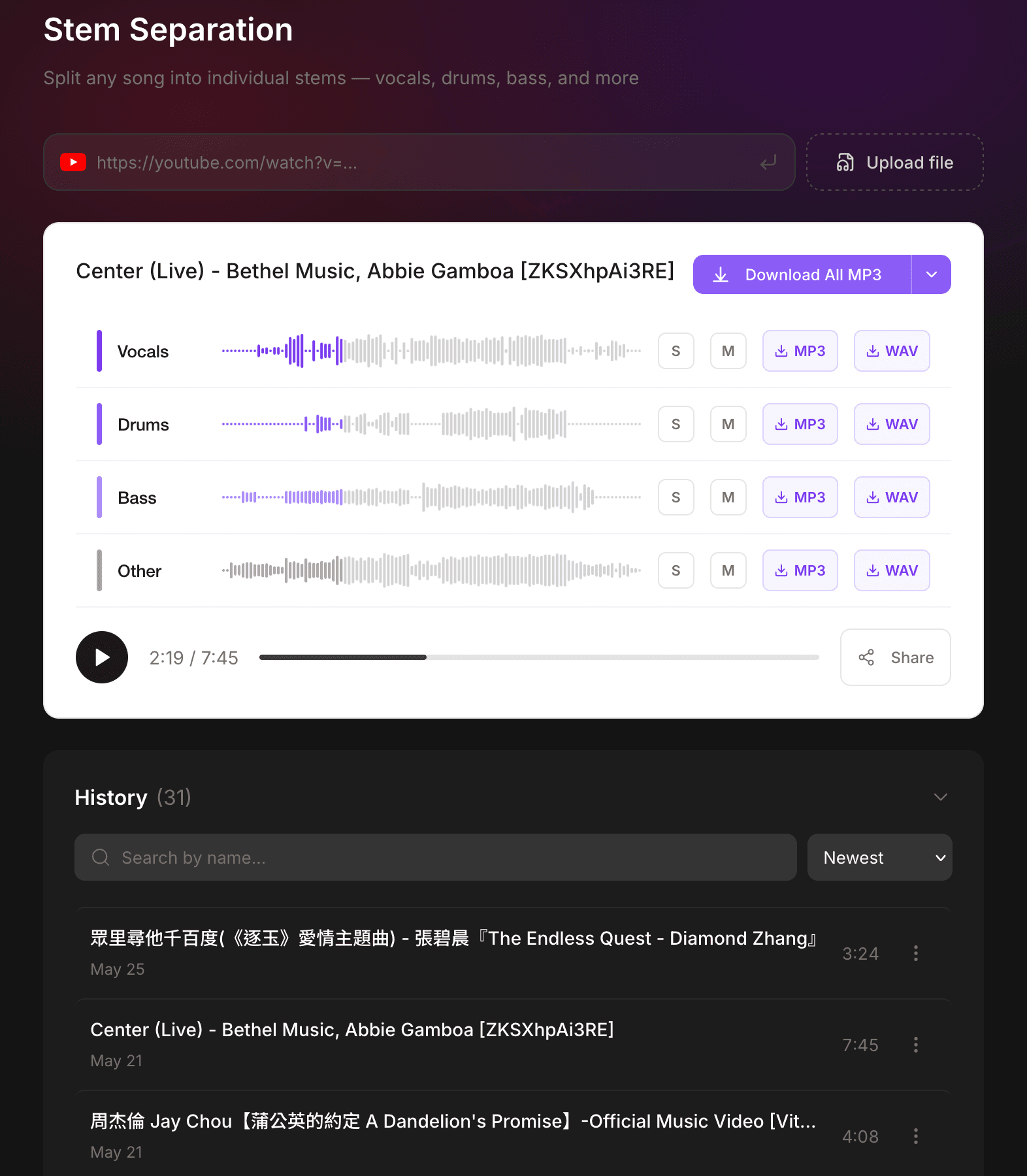
Keyboard shortcuts too: spacebar to play/pause, arrow keys to skip back and forth. Happy with it? Download stems individually, or download them all at once.
Formats and specs
Item | Spec |
|---|---|
Upload methods | Upload audio, or paste a YouTube link |
Input formats | MP3, WAV, FLAC, OGG, AAC, M4A, OPUS, WebM |
Max file size | 100 MB |
Stems | Vocals, drums, bass, other (4 tracks) |
Processing time | About 1–3 minutes |
Download formats | MP3 (free) / WAV (Starter plan and up) |
Is stem separation free?
Yes, it's free to use. Sign up, upload a song, and try it — downloads come as MP3, so you can hear what the AI pulls apart. The free plan includes a monthly trial quota shared across AI music generation and chord detection — one account, three tools to spend it on however you like.
Separating often, want lossless WAV, or planning to run a whole playlist through? Upgrade when you're ready: Starter (NT$79/mo) and Creator (NT$199/mo) offer higher monthly quotas, and paid stem downloads include WAV.
One account — more than separation
Once you've got your backing track, then what? In the same Muse Forge account you can run chord detection to pull a song's full chord progression (with guitar and ukulele fingerings), or use AI music generation to build a fresh track from a single line of text. No moving files between tools, no switching accounts — that's the point of Muse Forge: the best tools shouldn't get in the way of creating.
Not at your desk? The Muse Forge app is out — paste a YouTube link and split stems from your phone; mute the vocals and you have a backing track.
Want brand-new music instead of splitting an existing song? See how to use the AI music generator: one line of text, with prompt examples.
Drop in that song you've always wanted to cover. A few minutes later, you've got a clean backing track.
FAQ
Can stem separation split vocals from the instrumental?
Yes. You get four stems — vocals, drums, bass, and other. Mute the vocals for a backing track; keep only the vocals for an a cappella.
Which file formats are supported?
MP3, WAV, FLAC, OGG, AAC, M4A, OPUS, WebM — up to 100 MB per file.
How long does it take?
Usually 1 to 3 minutes, depending on file size.
Is it free?
Yes. Sign up and you can upload, separate, and download MP3; the free plan includes a monthly quota shared with the other tools. For lossless WAV or heavier use, upgrade for a higher monthly quota.