Turn Any Song into Free Piano Sheet Music | PopPianoAI
5 min read
Ever wanted to play the piano version of a song you love, only to find incomplete tabs, paywalled sheet music sites, or arrangements that sound nothing like the original?
There's a faster way. Paste a YouTube link, and about 3 minutes later you'll have complete piano sheet music with chord symbols — free, no sign-up needed to try.
What is PopPianoAI?
PopPianoAI is the AI piano arrangement feature on Muse Forge, built by DeepWave, an audio AI team from Taiwan. Give it a song, and the AI analyzes the melody, harmony, and rhythm, then rearranges the whole track into a playable piano version — sheet music with chord symbols, plus a piano audio rendition you can listen to right away.
And PopPianoAI is completely free. Without signing in, you can convert 1 song per day; with a free account, there's no limit. Other Muse Forge features use a seconds-based quota, but PopPianoAI never touches it.
How is this different from regular piano transcription AI?
Most piano transcription AI does exactly that — transcription: it takes music that is already a piano performance and writes it down as a score. The catch is you need a piano version first. A brand-new release nobody has covered yet, or a niche song with no piano cover? You're stuck.
PopPianoAI does something different: it starts from the original song. Vocals, harmonies, instruments, the groove of the drums — the AI decides what to keep and what to let go, condensing it all into a piano cover score designed for two human hands.
In one sentence: regular transcription AI turns piano music into piano scores; PopPianoAI turns an entire pop song into a piano cover you can actually play. Many songs go unplayed not because they aren't beautiful, but because no usable sheet music exists — that's the problem PopPianoAI solves.
From song to score in three steps
No music theory required:
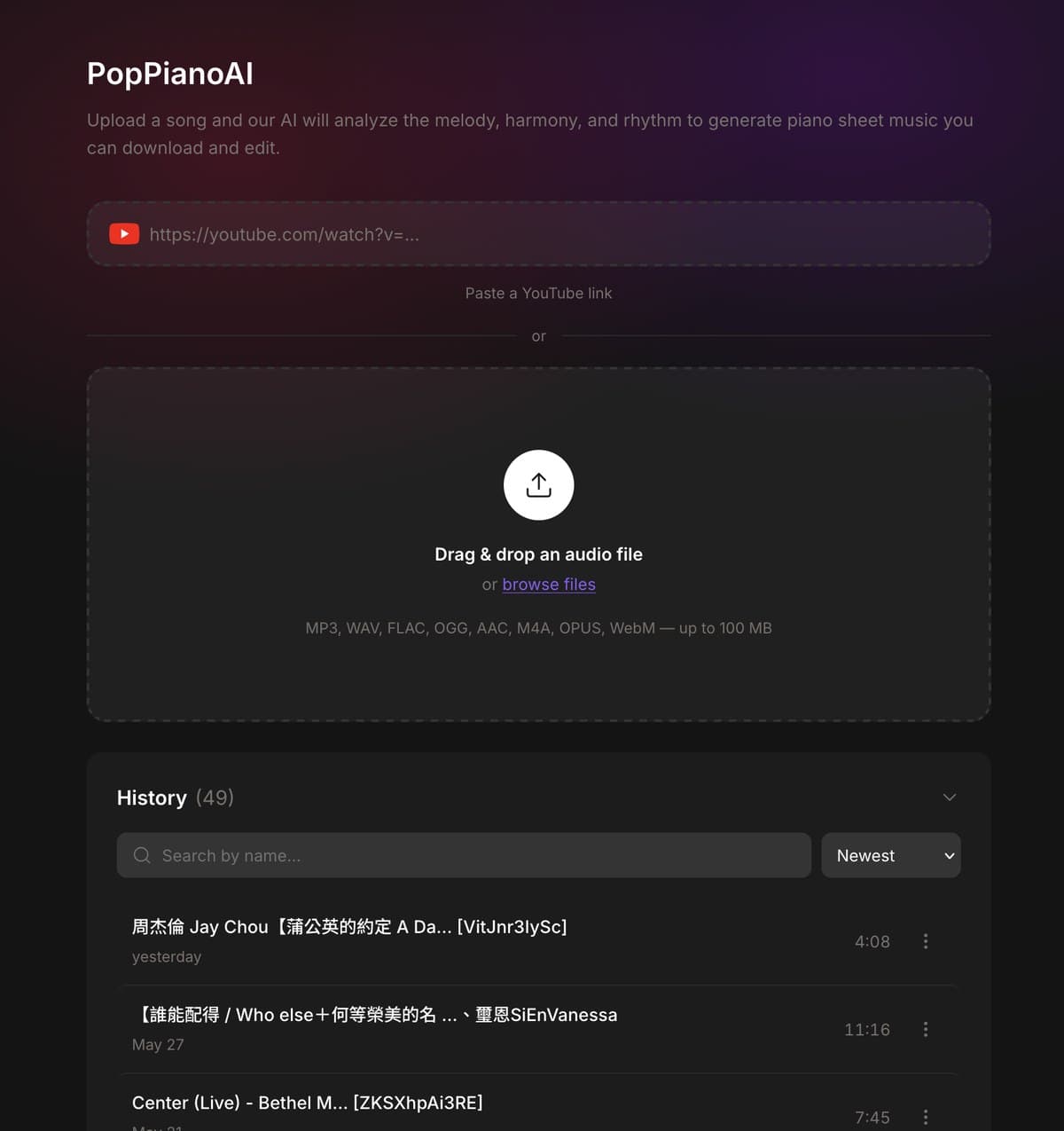
- Paste a link or upload a song: Open PopPianoAI, paste a YouTube link, or drag in an audio file. Pop songs, anime themes, film scores, even your own demos all work.
- Let the AI arrange: The AI analyzes the melody, harmony, and rhythm of the full song and arranges a solo piano version in about 3 minutes.
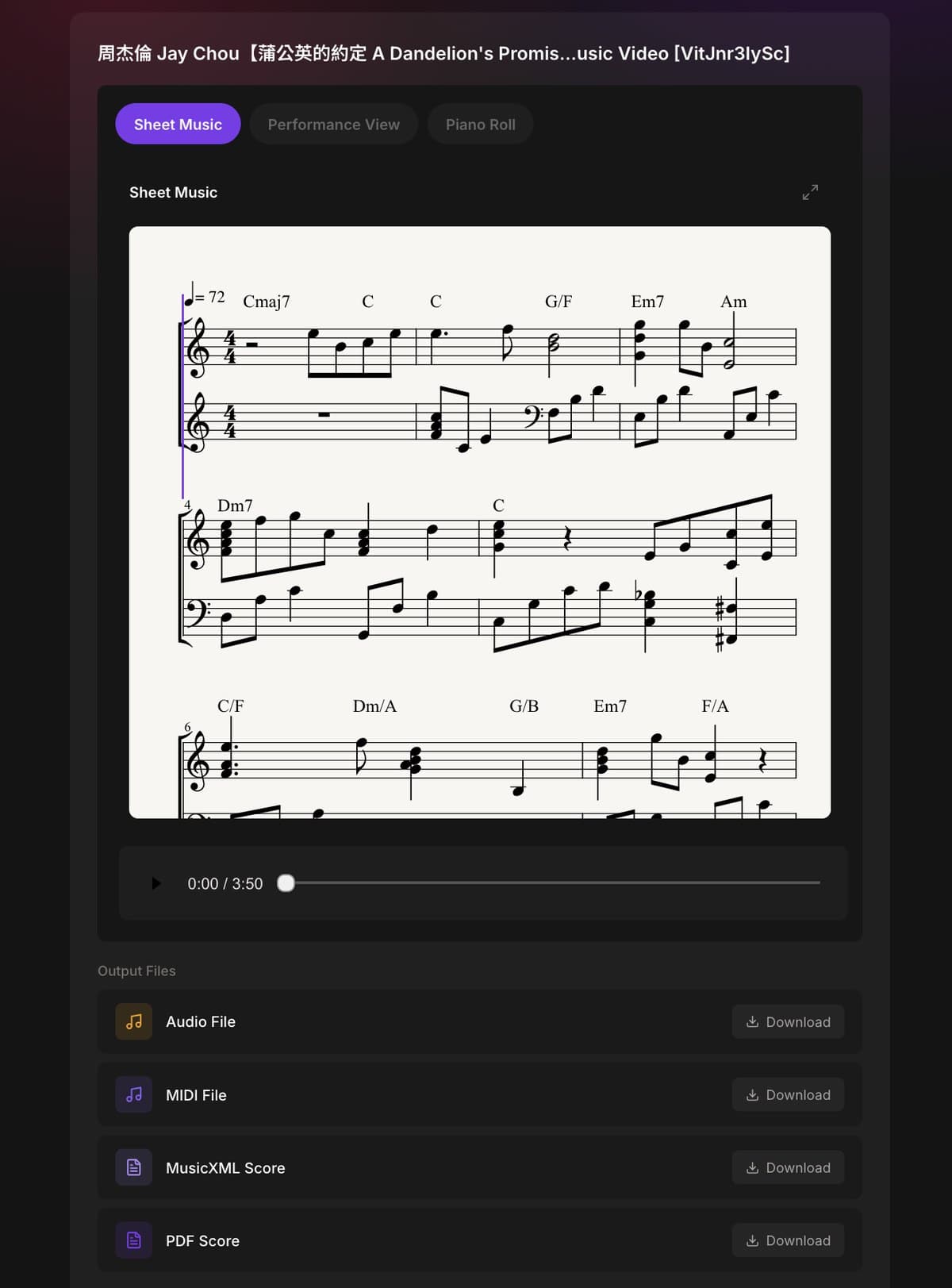
- Listen and download: Preview the piano version and the score online (switch between Performance View and Piano Roll), then download when you're happy.
Four outputs, each with its own use
Output | What it's for | Best for |
|---|---|---|
PDF score | Print it or read on a tablet, chord symbols included | Anyone ready to start practicing |
Piano audio | Listen directly, use as a reference or background music | Hearing it before playing it |
MusicXML | Edit in MuseScore, Sibelius, and other notation software | Adjusting difficulty or rearranging |
MIDI | Import into a DAW or play through a digital piano | Producers and arrangers |
This is the biggest difference between PopPianoAI and most sheet music sites: you don't get a fixed score — you get material you can keep working with. Section too hard? Simplify it in MuseScore. Want it in your own production? Drag the MIDI into your DAW. Want to show it off? There's a share link right on the results page.
The result page is a practice tool: play along while you listen
Before you even download, the result page itself is something to practice with. The default sheet music view is real staff notation with chord symbols; a playhead moves note-by-note with the music and auto-scrolls to the current bar — like an online play-along score. Hit fullscreen (or press F) for an immersive, full-page view; no need to print a PDF before you start.
From the same page you can switch to Performance view (a falling-keys keyboard — watch the keys light up and follow along) and Piano Roll. All three views have a built-in player, so you can preview anytime.
One link to share your finished score
Every result can be shared in one click. Whoever opens the link doesn't need to register or log in — they can play the piano version and read the score right on the page, with a “Try it now” entry at the bottom. A teacher sending a score to a student, a cover creator posting to social — what they get is a fully interactive result page, not a flat image.
Who gets the most out of PopPianoAI?
Piano learners — Nothing motivates practice like playing songs you actually love. Turn the track you've had on repeat into sheet music, listen to the AI's rendition first, and practicing stops feeling like a chore.
Music teachers — Students want to learn pop and anime songs that rarely have existing scores. Paste a link before class, wait 3 minutes, and save hours of transcribing by hand.
Cover artists and video creators — Prep for a piano cover video goes from 'hunt for sheet music or transcribe by ear' to 'paste a link and start practicing.'
Church pianists and accompanists — Worship songs and lesser-known pieces often have no piano version. As long as you have the original audio, you can generate a score that works for real accompaniment.
Accompanying a singer and don't want the piano to double the melody? Try Forge's Piano Accompaniment Score: it removes the vocals first, then arranges the backing for piano.
Frequently asked questions
Is PopPianoAI free? Do I need an account?
Completely free. Without signing in, you can convert 1 song per day; with a free account there's no limit, and it never consumes your Muse Forge quota.
Can I use a YouTube link? What audio formats are supported?
Yes — just paste a YouTube link. For audio files, it supports MP3, WAV, FLAC, OGG, AAC, M4A, OPUS, and WebM, up to 100 MB per file. Phone recordings, your own demos, and purchased audio all work.
How long a song can it handle?
Up to 20 minutes per file, with 10 minutes or less giving the best results — plenty for any typical pop or anime song.
Can I edit the generated sheet music?
Yes. Besides the PDF, you also get MusicXML and MIDI files, which open in MuseScore (free), Sibelius, Finale, and other notation software — or any DAW.
How does it compare to manual transcription?
Manual transcription is precise but slow and costly — often days of waiting and a real fee per song. PopPianoAI takes about 3 minutes and costs nothing, and you can fine-tune the result yourself.
Turn your favorite song into a piano piece right now
No music theory, no payment, no sign-up to try. Open PopPianoAI and paste the song you've always wanted to play.
Generate my first piano score for free →
One more thing: Muse Forge also offers stem separation (split a song into vocals, drums, and bass), chord recognition (with guitar and ukulele fingerings), and AI music generation. A free account comes with 150 seconds of monthly quota to try them — once you've got your score, have a play.
A quick note: before converting audio into a piano cover score, please make sure you own or have obtained the rights to use that audio. Use of the output should comply with copyright law and the original work's license.